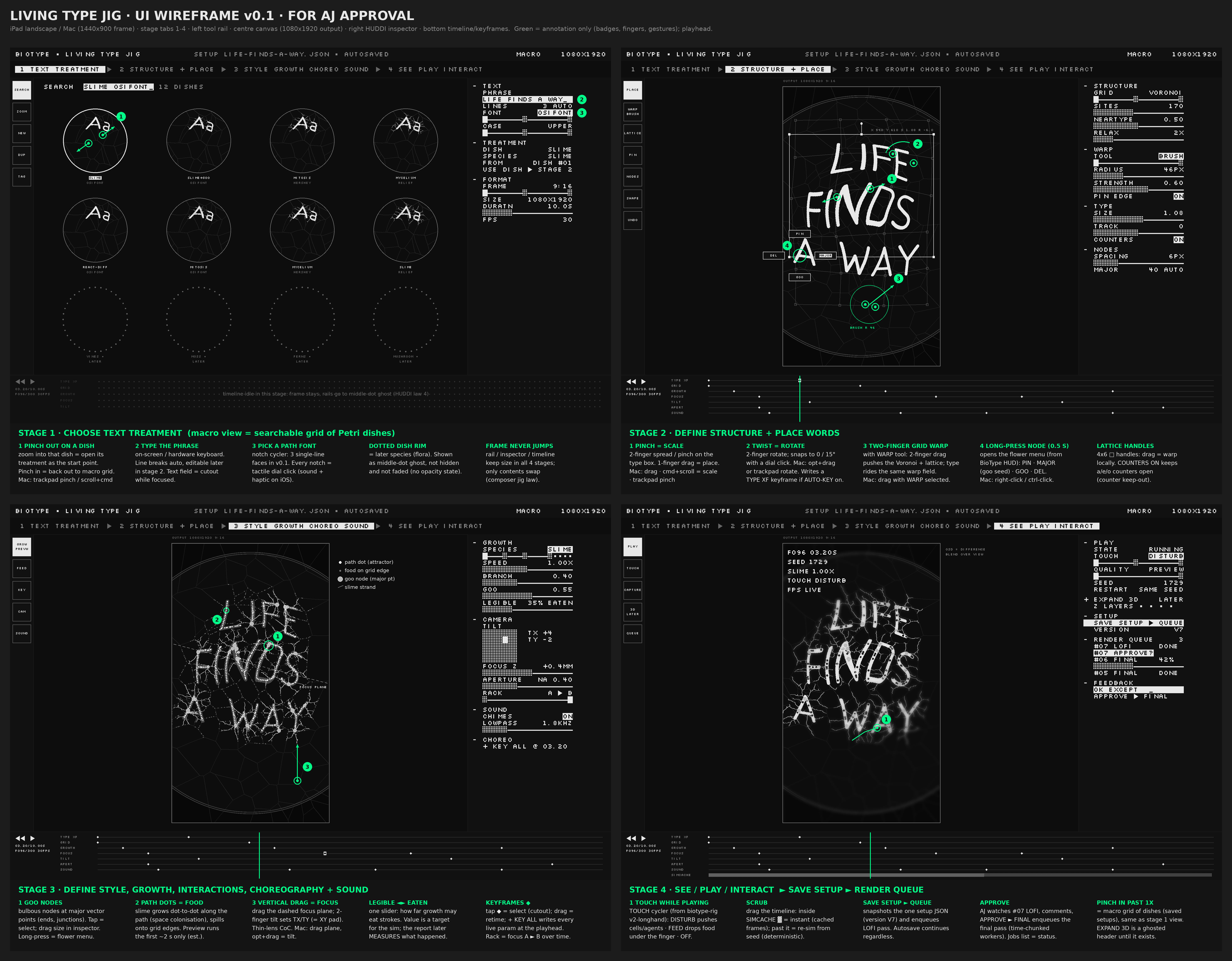
1440×900 frame: stage tabs 1–4, left tool rail, centre canvas, right HUDDI inspector, bottom timeline/keyframes. Green = annotation only. Open full resolution.
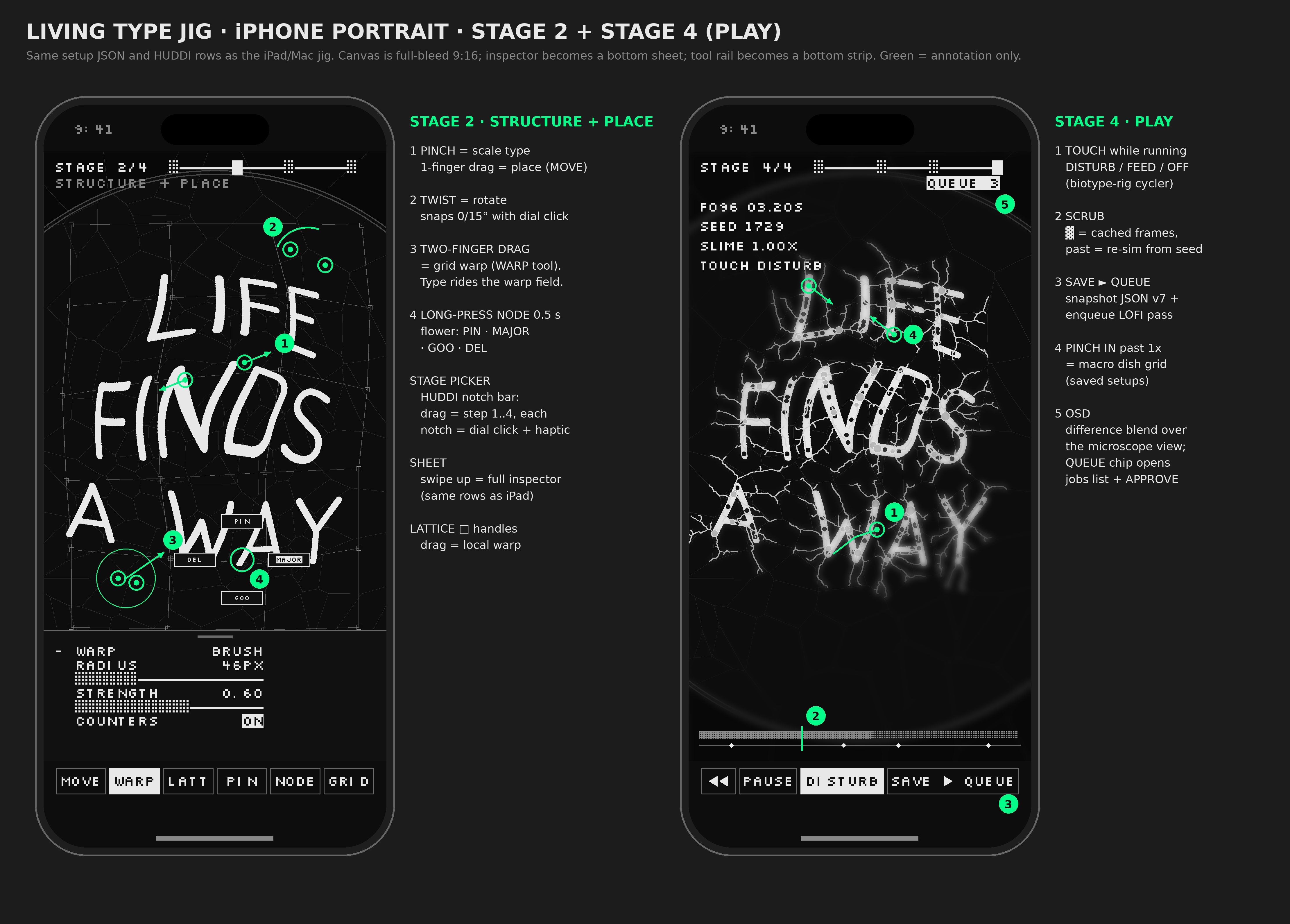
iPhone portrait · stage 2 + stage 4
Same setup JSON and HUDDI rows as the iPad/Mac jig. Canvas is full-bleed 9:16; the inspector becomes a bottom sheet and the tool rail a bottom strip.
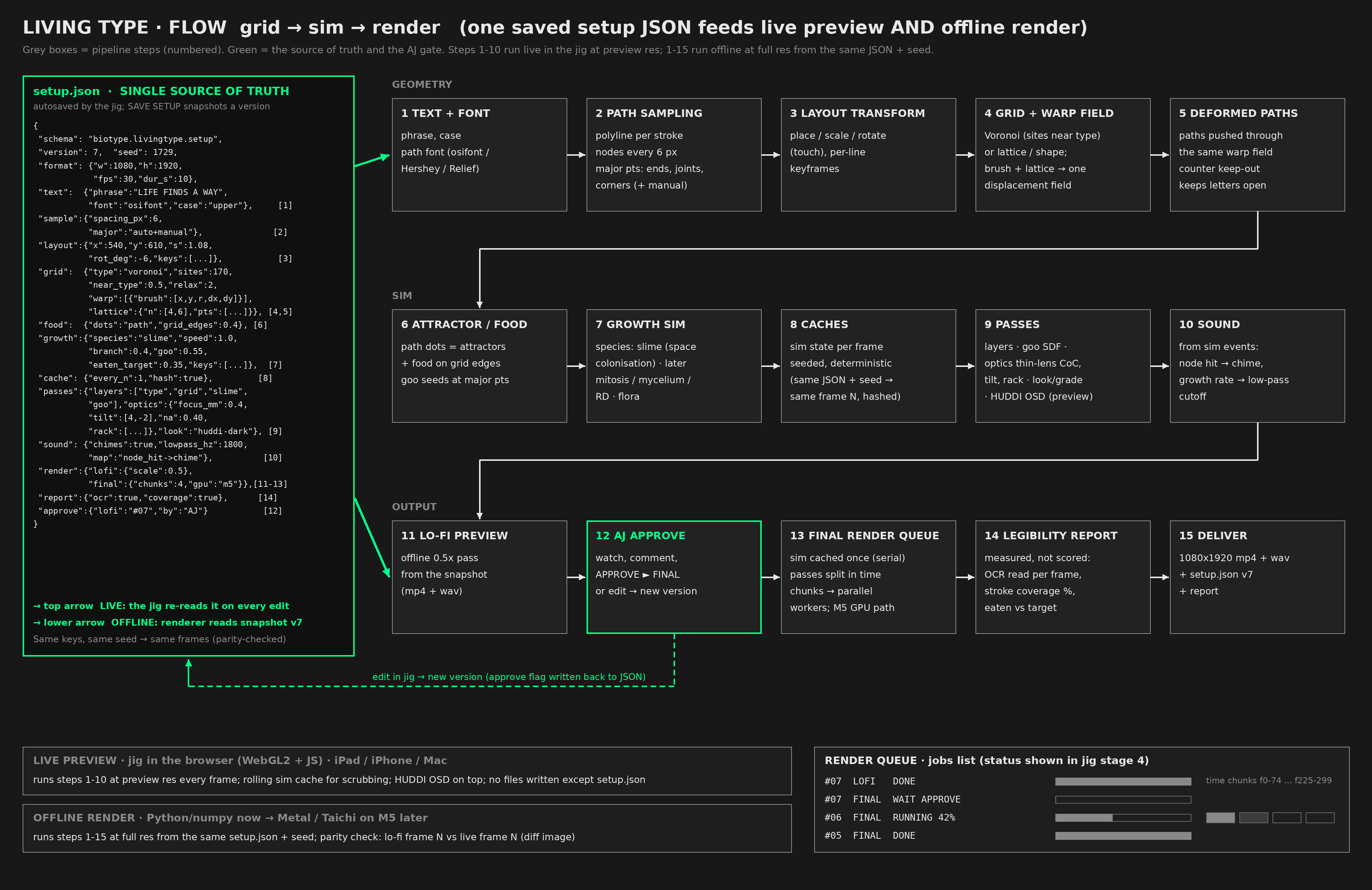
Flow · grid → sim → render
One saved setup JSON feeds both the live preview and the offline render. Same keys, same seed → same frames.
MVP scope (v0.1)
v0.1 · in
Text. Type a phrase and pick one of 3 single-line path fonts (proposed: osifont ISO 3098, Hershey Simplex, Relief SingleLine). Case and line breaks set in the inspector.
Macro view. A searchable grid of Petri dishes for presets and saved setups. Pinch into a dish to open it, pinch out to go back. Stage 1 uses the same view.
Place by touch. One finger drags, pinch scales, twist rotates (snaps to 0° and 15° with a dial click). On a Mac: drag, cmd+scroll or trackpad pinch, opt+drag. Pointer Events cover iPad, iPhone and Mac.
Structure. Grids live in a Petri dish by default (round 90 mm; alternatives Free and Rect): sites clipped to the dish and Lloyd-relaxed, warp fades to zero at the rim. Voronoi grid packed near the type, a simple warp brush (two-finger drag) and a 4×6 lattice of handles. Type and grid move through the same displacement field; a counter keep-out stops a, e, o from closing.
Path sampling. Nodes every N px along each stroke; major points (ends, junctions, corners) found automatically. Long-press a node for the flower menu: PIN · MAJOR · GOO · DEL.
One growth species, live in WebGL2. Slime: space colonisation dot to dot along the path, spilling onto grid edges, with bulbous goo nodes at major points. Controls: speed, branch, goo size and the legible ◄► eaten target.
Play. Play, pause, restart with the same seed. Touch modes DISTURB, FEED, OFF. Scrub inside a rolling sim cache. OSD drawn in difference blend over the dish view.
Minimal choreography. Keyframes (◆) for type transform, growth speed, focus z and aperture. Preview-quality thin-lens CoC, tilt and rack.
Sound (minimal). A chime on each node hit and a global low-pass, via WebAudio.
Setup JSON. Autosaved on every edit. SAVE SETUP ► QUEUE snapshots a version (v1, v2, …); export and import.
Offline renderer (Python/numpy). Reads the same JSON and seed and renders a lo-fi pass (0.5×) as mp4 + wav. Jobs list shows QUEUED / RUNNING % / DONE / WAIT APPROVE. APPROVE ► FINAL queues the full-res pass.
Later · not in v0.1
More species: mitosis, mycelium, reaction-diffusion; then flora: vines, moss, ferns, blossoms, cacti, mushrooms (shown as dotted “ghost” dishes and disabled notches).
Expand into 3D (z layers, a volumetric dish), building on the existing BioType 3D plans.
Final render split into time chunks across parallel workers (sim cached once, passes in parallel). A Metal / Taichi path on the M5.
Full optics: ring bokeh, LoCA, focus hunt. Looks and grades. Layered passes and goo SDF shading at final quality.
Legibility / measurement report: OCR read rate per frame, stroke coverage %, eaten vs target.
Sound mapped from more sim events (growth rate → cutoff, branching → pitch).
Hardware dial bound to the same HUDDI controls.
Tech choices
Jig: plain JS + WebGL2 in one static page, no build step; runs on iPad, iPhone and Mac. Chrome uses the HUDDI kit and Silkscreen. Sim state in float textures, growth in ping-pong passes.
Fonts: Hershey and Relief SingleLine are true single-stroke. osifont ships as an outline TTF, so v0.1 extracts its centreline once per glyph (cached).
One contract: a versioned setup.json read by both the live jig and the renderer; grid boundary defaults to a 90 mm Petri dish. Seeded PRNG (mulberry32) runs the same in JS and Python.
Renderer: Python/numpy, same pipeline order as the jig, deterministic cache (same JSON + seed → same frame N). WebGL2 ↔ numpy parity is visual (diff image), not bit-exact; the offline render is the reference.
Estimates (unmeasured): live slime preview ~0.5× res aiming for 30 fps on a recent iPhone/iPad; v0.1 build ~2–3 focused weeks; lo-fi 10 s / 300-frame pass in minutes on the M5 CPU.